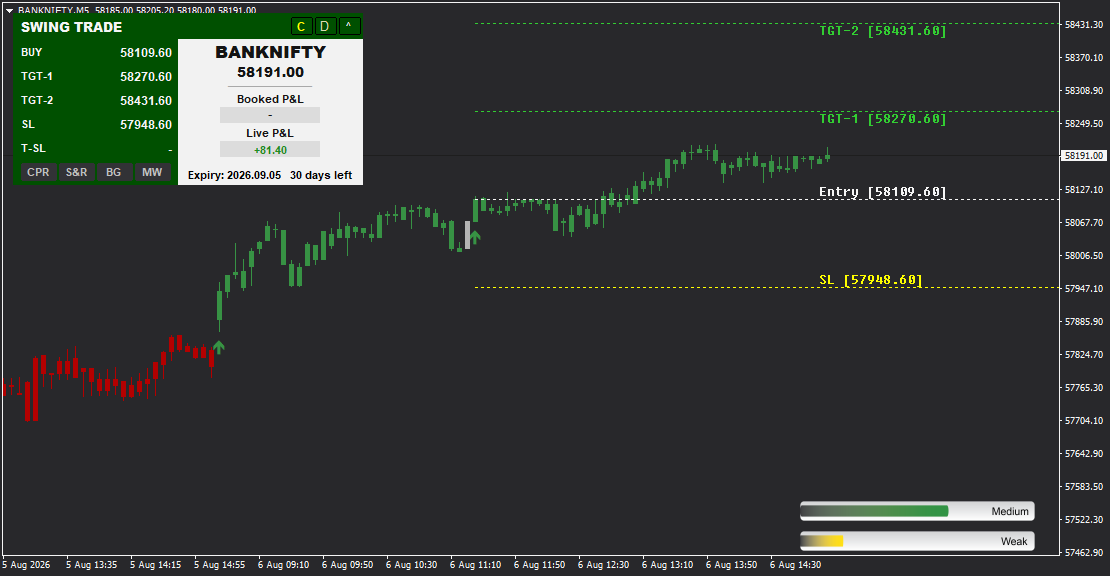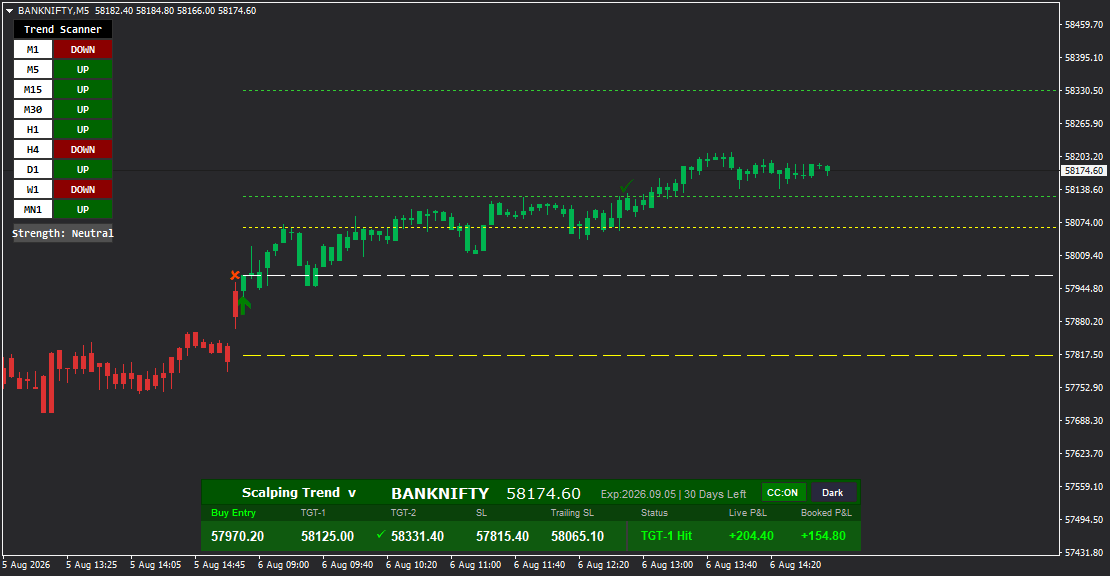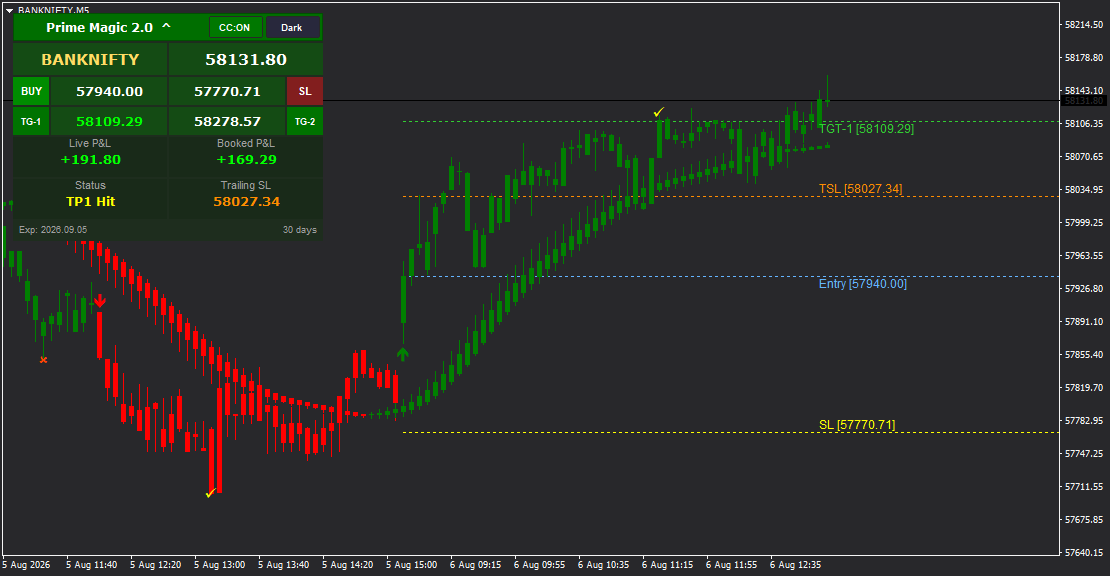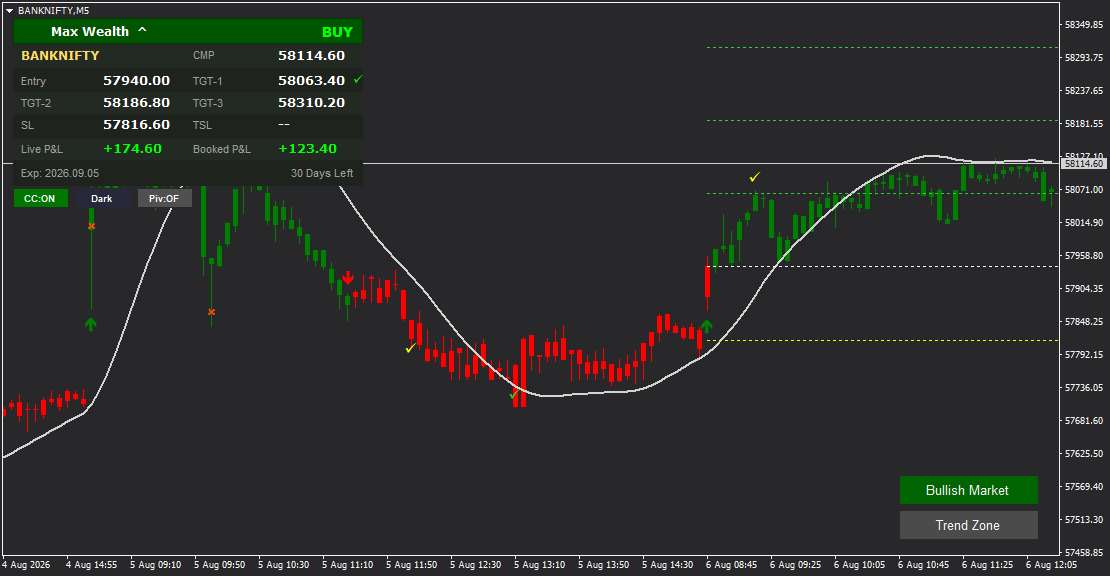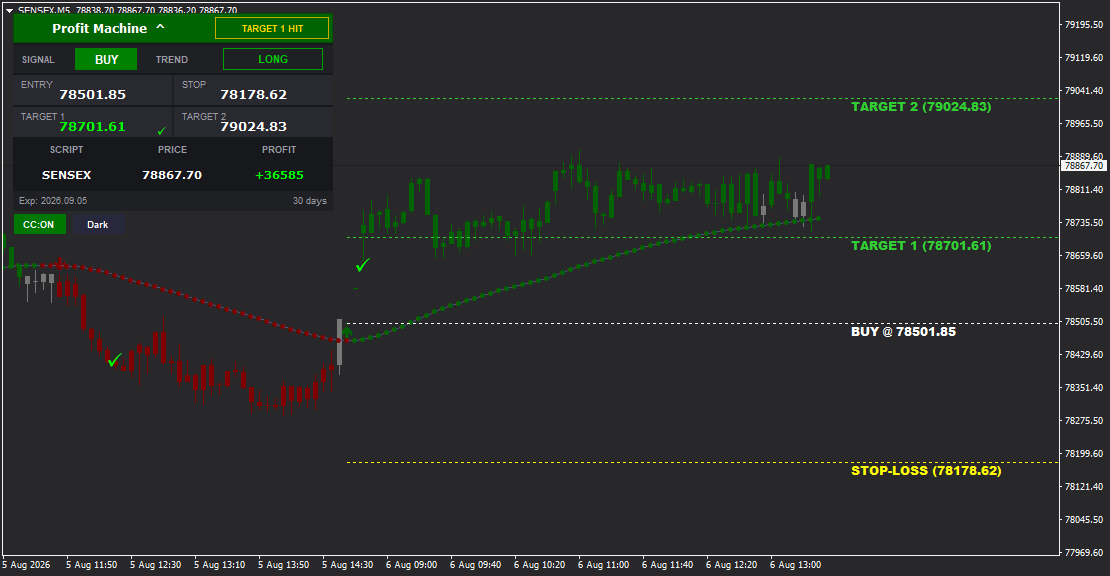

Profit Machine is a powerful MT4 indicator designed to generate consistent profits through clear BUY/SELL signals with complete trade management. It combines precise entry signals with dual targets (TARGET 1 and TARGET 2), stop loss protection, and real-time MT4 Data Feed profit tracking. Features a unique TREND indicator (LONG/SHORT) for independent trend confirmation, visual status boxes ("TARGET 1 HIT", "ACTIVE"), dotted trend lines showing price direction, color-coded candles with CC-ON/OFF toggle, Light/Dark theme support, and labeled on-chart price lines. Perfect for traders seeking a systematic, profit-focused trading system with built-in trend validation.
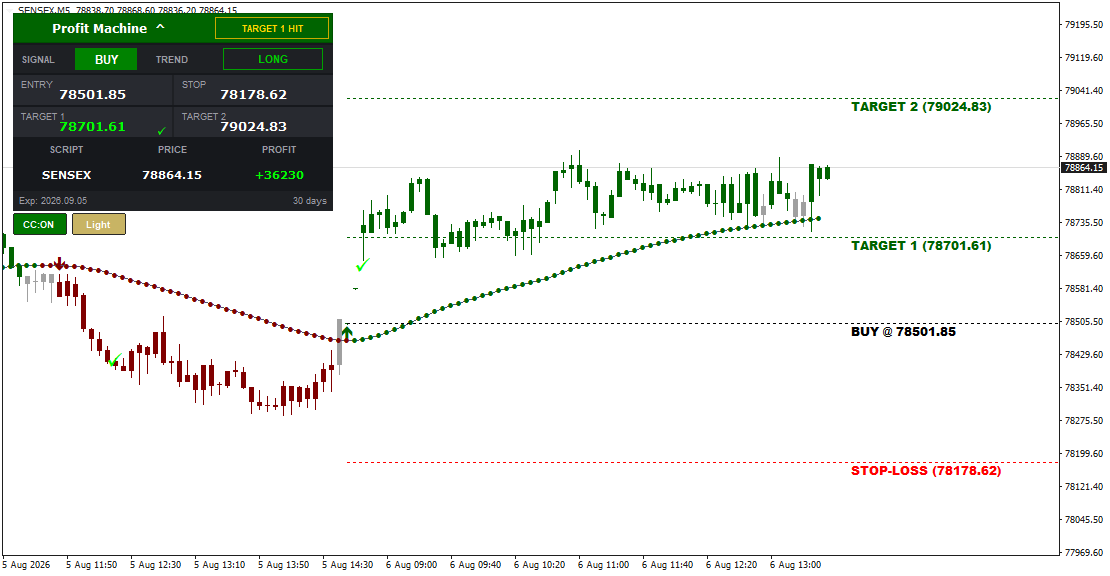
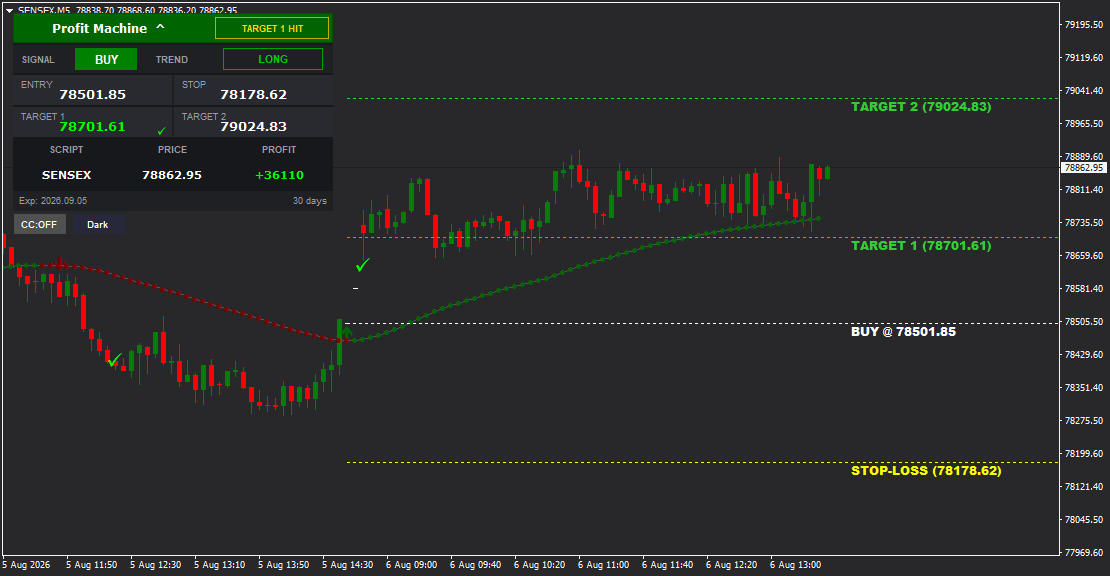
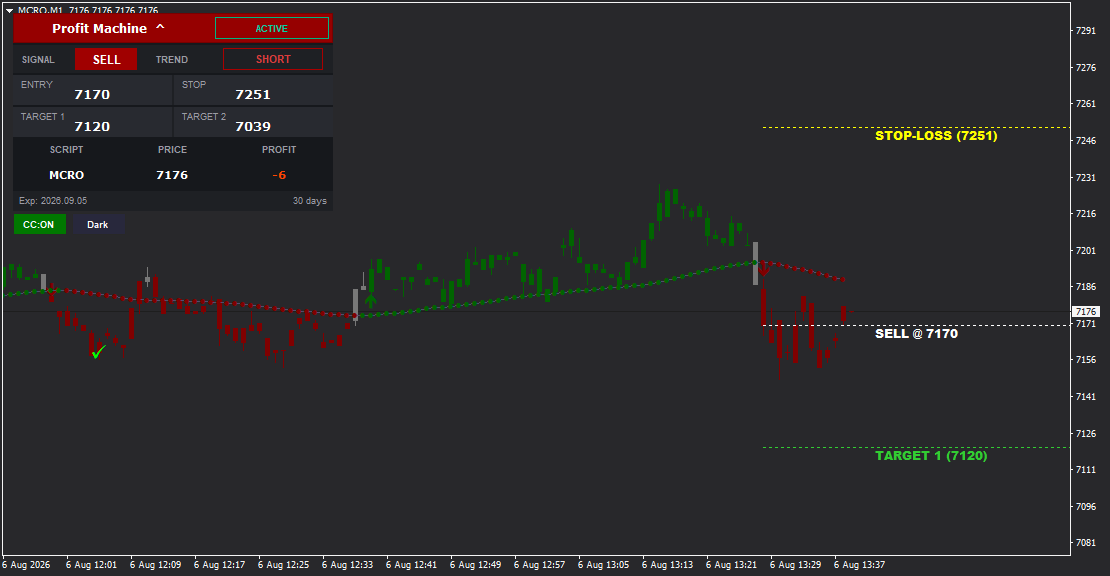
Profit Machine - Systematic Trading with Trend Confirmation
Our data feed integration ensures precision signal delivery across all trading pairs.
Profit Machine is a professional MetaTrader 4 indicator built for one purpose: generating consistent profits through systematic signal execution and intelligent trend alignment. This leverages MT4 Data Feed for optimal performance. Every signal provides complete trade information with Entry, Stop Loss, Target 1, Target 2, plus a separate TREND indicator for independent confirmation.
Key Features:
Dual Signal System
What sets Profit Machine apart is its two-layer confirmation:
- SIGNAL - BUY or SELL trade direction (green/red button)
- TREND - LONG or SHORT market trend (green/red box)
When SIGNAL and TREND align (BUY + LONG, or SELL + SHORT), you have maximum confidence. This dual confirmation reduces false signals and increases win rate.
Complete Trade Setup
- ENTRY - Exact entry price (78501.85, 7170)
- STOP - Stop loss for risk protection (78178.62, 7251)
- TARGET 1 - First profit target (78701.61, 7120)
- TARGET 2 - Extended profit target (79024.83, 7039)
- Checkmark (-) - Appears when TARGET 1 is achieved
Visual Status System
Profit Machine displays trade status in prominent boxes at chart top:
- "TARGET 1 HIT" (green box) - First target achieved, book profits
- "ACTIVE" (red box) - Trade is currently running
- Instant situation awareness at a glance
Real-Time Profit Tracking
- PROFIT Field - Live running profit/loss displayed prominently
- Green text (+36585) for profits, red text (-6) for losses
- Updates continuously as price moves
- Know your exact position at all times
Dotted Trend Lines
Profit Machine draws dotted trend lines on chart:
- Green dotted line (upward) - Bullish trend, confirms BUY signals
- Red dotted line (downward) - Bearish trend, confirms SELL signals
- Visual trend guidance aligned with TREND indicator
- Helps identify optimal trend-following entries
Color-Coded Candle System
CC-ON Mode:
- Candles colored in trend sections (green for bullish, red for bearish)
- Instant visual trend recognition
- Reduces analysis time
CC-OFF Mode:
- Standard mixed candle colors
- Traditional candlestick view
On-Chart Labeled Lines
All price levels clearly marked:
- BUY @ [price] or SELL @ [price] - Entry line
- STOP-LOSS [price] - Stop loss line (yellow/orange)
- TARGET 1 [price] - First target line (green)
- TARGET 2 [price] - Second target line (green)
Light/Dark Theme
- Dark - Professional black background, reduces eye strain
- Light - Clean white background, perfect for bright environments
- One-click theme switching
Dashboard Layout
- "Profit Machine" header with status box (TARGET 1 HIT / ACTIVE)
- SIGNAL (BUY/SELL) and TREND (LONG/SHORT) with color coding
- ENTRY and STOP on left
- TARGET 1 (with - when hit) and TARGET 2 on right
- SCRIPT (instrument name), PRICE (current), PROFIT (running P/L)
- Expiry date with countdown
- CC-ON/OFF and Dark/Light control buttons
How It Works:
1. Wait for signal: SIGNAL shows BUY or SELL
2. Check trend confirmation: TREND shows LONG (for BUY) or SHORT (for SELL)
3. When aligned, enter at ENTRY price
4. Set stop loss at STOP level
5. Monitor PROFIT field for live P/L
6. When status shows "TARGET 1 HIT", book 50-60% of position
7. Hold remainder for TARGET 2
8. Dashboard updates status throughout trade lifecycle
Trading Strategy:
High-Confidence Trades (Best Setups):
- BUY + LONG - Signal and trend both bullish, full position
- SELL + SHORT - Signal and trend both bearish, full position
- Dotted trend line aligns with signal direction
- Trade with maximum confidence
Medium-Confidence Trades:
- Signal appears but TREND is opposite (BUY with SHORT trend)
- Possible counter-trend opportunity
- Trade with reduced position size (25-50%)
- Book at TARGET 1 only, don't hold for TARGET 2
Position Management:
- At Entry: Full position, set STOP
- Status shows "TARGET 1 HIT": Book 50-60%, status confirms achievement
- At TARGET 2: Book remaining 40-50%
- If STOP hit: Accept loss, wait for next signal
Why Choose Profit Machine?
- Dual Confirmation - SIGNAL + TREND validation reduces false trades
- Visual Status - Status boxes give instant trade state awareness
- Profit Focus - Real-time PROFIT tracking keeps you informed
- Complete System - Entry, Stop, dual targets, trend lines, everything included
- Easy Interpretation - Green = bullish, red = bearish, checkmarks = achieved
- Professional Design - Clean dashboard, organized information architecture
- Universal - All timeframes, all instruments
Technical Specifications
- Platform: MetaTrader 4 (MT4)
- Trading Styles: Intraday and positional
- Timeframes: All (M1, M5, M15, M30, H1, H4, D1, W1)
- Instruments: All (Stocks, Indices, Forex, Commodities, Crypto)
- Signal Components: Entry, Stop, Target 1, Target 2
- Confirmation System: Dual-layer (SIGNAL + TREND)
- Status Display: TARGET 1 HIT, ACTIVE
- Visual Elements: Dotted trend lines, color-coded candles, labeled chart lines
- Performance Tracking: Real-time PROFIT field
- Visual Controls: CC-ON/OFF, Dark/Light theme
- Repainting: No (signals are permanent)
Package Includes
- Profit Machine MT4 Indicator (.ex4 file)
- Installation Guide (PDF)
- User Manual (PDF)
- Signal-Trend Confirmation Strategy Guide (PDF)
- Video Tutorial - Setup & Configuration
- Video Tutorial - Trading with Dual Confirmation
- Video Tutorial - Position Management
- Lifetime License (Single Account)
- Free Updates for 1 Year
- Email Support
Turn Signals into Profits with Machine Precision.
Profit Machine eliminates guesswork through dual confirmation (SIGNAL + TREND), real-time profit tracking, and visual status updates. Trade with clarity, confidence, and systematic discipline.
========================================
FEATURE HIGHLIGHTS (Bullet Points)
========================================
- Dual Confirmation System - SIGNAL (BUY/SELL) + TREND (LONG/SHORT) for validation
- Visual Status Boxes - "TARGET 1 HIT" and "ACTIVE" at chart top
- Complete Trade Setup - Entry, Stop, Target 1, Target 2 for every signal
- Real-Time Profit Tracking - PROFIT field shows live P/L with color coding
- Dotted Trend Lines - Green upward for bullish, red downward for bearish
- Target Achievement Confirmation - Checkmark (-) appears when TARGET 1 hit
- Color-Coded Candles - CC-ON/OFF toggle for trend-colored candle sections
- On-Chart Labeled Lines - BUY/SELL @, STOP-LOSS, TARGET 1, TARGET 2 clearly marked
- Light/Dark Theme - Instant theme switching for any environment
- Color-Coded Dashboard - Green for BUY/LONG, red for SELL/SHORT
- Script Display - Shows instrument name for reference
- Current Price - PRICE field displays live market price
- License Tracker - Expiry countdown display
- Universal Compatibility - All timeframes and instruments
- No Repainting - Signals are final and permanent
========================================
RECOMMENDED TRADING APPROACH
========================================
Standard Strategy:
1. Wait for SIGNAL to appear (BUY or SELL)
2. Check TREND indicator for confirmation:
- BUY + LONG = High confidence, full position
- SELL + SHORT = High confidence, full position
- Opposite trend = Low confidence, skip or 25% position
3. Verify dotted trend line aligns with signal direction
4. Enter at ENTRY price, set stop at STOP level
5. Monitor PROFIT field for live performance
6. When status box shows "TARGET 1 HIT":
- Book 50-60% of position immediately
- Move stop to breakeven on remainder
7. Hold remaining 40-50% for TARGET 2
8. If stop hit, accept loss and wait for next signal
Conservative Approach:
- Only trade when SIGNAL and TREND perfectly align
- Book 60-70% at TARGET 1
- Book remaining 30-40% at TARGET 2
- No holding past TARGET 2
Aggressive Approach:
- Trade all signals (even with opposite TREND)
- Book only 40% at TARGET 1
- Hold 60% for TARGET 2
- Accept higher risk for larger gains
Confirmation Checklist:
High-Confidence Setup (Trade Full Size):
- - SIGNAL and TREND aligned (BUY+LONG or SELL+SHORT)
- - Dotted trend line confirms direction
- - CC-ON candles show matching color section
- - Trade with full position, hold for both targets
Low-Confidence Setup (Reduce Size or Skip):
- - SIGNAL and TREND opposite (BUY+SHORT or SELL+LONG)
- - Dotted trend line conflicts with signal
- - Trade 25% position or skip, book at TARGET 1 only
Timeframe Recommendations:
- M5/M15 (Scalping/Intraday): Quick moves, 3-8 signals per session, book 60%/40% split
- M30/H1 (Swing Intraday): Standard moves, 2-4 signals per day, book 50%/50% split
- H4/D1 (Positional): Extended moves, 1-2 signals per week, book 40%/60% split
Using the PROFIT Field:
The PROFIT field is your real-time performance gauge:
- Green positive number (+36585) = Trade going well, targets achievable
- Red negative number (-6) = Trade going against you, stop loss may trigger
- Profit growing rapidly = Strong trend, high probability of hitting both targets
- Profit stagnant near zero = Choppy price action, be ready to exit at breakeven
========================================
SIGNAL-TREND CONFIRMATION GUIDE
========================================
Understanding the Dual System:
SIGNAL (BUY/SELL):
- Primary trade direction
- Indicates entry opportunity
- Green button = BUY, red button = SELL
TREND (LONG/SHORT):
- Independent trend assessment
- Confirms market direction
- Green box = LONG (uptrend), red box = SHORT (downtrend)
Why Both Matter:
A BUY signal in a SHORT trend means you're fighting the overall trend (counter-trend trade). While it can work, the probability is lower. A BUY signal in a LONG trend means you're trading WITH the trend (trend-following trade) - much higher probability.
Four Possible Combinations:
1. BUY + LONG (Best BUY Setup)
- Signal and trend aligned bullish
- Trade with full confidence
- Hold for both TARGET 1 and TARGET 2
- Dotted green trend line confirms
2. SELL + SHORT (Best SELL Setup)
- Signal and trend aligned bearish
- Trade with full confidence
- Hold for both TARGET 1 and TARGET 2
- Dotted red trend line confirms
3. BUY + SHORT (Counter-Trend BUY)
- BUY signal but market trend is bearish
- Lower probability, possible reversal attempt
- Trade 25-50% position size
- Book at TARGET 1, don't hold for TARGET 2
4. SELL + LONG (Counter-Trend SELL)
- SELL signal but market trend is bullish
- Lower probability, possible reversal attempt
- Trade 25-50% position size
- Book at TARGET 1, don't hold for TARGET 2
Pro Tip:
Focus 80% of your trading on aligned setups (BUY+LONG, SELL+SHORT). These produce the most consistent profits and stress-free trading.
========================================
VISUAL ELEMENTS GUIDE
========================================
Status Boxes (Top of Chart):
"TARGET 1 HIT" (Green Box):
- Appears when TARGET 1 price level is reached
- Signals time to book partial profits
- Confirmation that trade is working
"ACTIVE" (Red Box):
- Appears on active SELL trades
- Indicates trade is currently running
- Status pending (no targets hit yet)
Dotted Trend Lines:
Unlike solid or curved lines, Profit Machine uses dotted/dashed trend lines:
- Green Dotted Upward Line - Bullish trend direction
- Red Dotted Downward Line - Bearish trend direction
- Follows price naturally
- Aligns with TREND indicator (LONG shows green line, SHORT shows red line)
Color-Coded Candles:
CC-ON Mode:
- Large sections of chart colored green (bullish) or red (bearish)
- Matches TREND direction
- Instant visual trend recognition
CC-OFF Mode:
- Standard candle colors per individual candle
- For traditional analysis and pattern recognition
Dashboard Color Coding:
- Green Elements - BUY signal, LONG trend, positive profit
- Red Elements - SELL signal, SHORT trend, negative profit
- White/Gray Text - Neutral information (prices, labels)
- Yellow Checkmarks - Achieved targets
Theme Options:
Dark Theme:
- Black background
- Default professional aesthetic
- Reduces eye strain during extended trading
Light Theme:
- White background
- Clean modern appearance
- Perfect for bright offices and presentations
========================================
PERFORMANCE TRACKING
========================================
PROFIT Field:
The PROFIT field is your real-time scoreboard:
Positive Profit (Green):
- Example: +36585 means up 36,585 points
- Trade moving in your favor
- Targets becoming more likely
Negative Profit (Red):
- Example: -6 means down 6 points
- Trade moving against you
- Stop loss may trigger
Zero or Near Zero:
- Trade is at breakeven
- Wait for direction to establish
Strategic Use:
- Profit increasing steadily - Trend is strong, hold for both targets
- Profit hit +200 then dropped to +50 - Price retraced, consider booking early
- Profit negative but not near stop - Give trade room, don't panic exit
- Profit near TARGET 1 level - Prepare to book partial when status shows "TARGET 1 HIT"
Comparing to TARGET Values:
If TARGET 1 is 200 points away and PROFIT shows +180, you're close to TARGET 1. Watch for status box to change to "TARGET 1 HIT" for confirmation.
========================================
DASHBOARD INFORMATION GUIDE
========================================
SCRIPT Field:
- Shows instrument/symbol name (e.g., SENSEX, MCRO)
- Reference to confirm you're viewing correct instrument
- Useful when trading multiple charts
PRICE Field:
- Current market price updating in real time
- Example: 78867.70, 7176
- Helps you see distance to ENTRY, targets, and STOP
Expiry Display:
- Shows license expiry date (e.g., Exp: 2026.09.05)
- Countdown in days (e.g., 30 days)
- Plan renewals accordingly
Button Controls:
- CC-ON / CC-OFF - Toggle colored candles (green when active)
- Dark / Light - Switch theme (tan/yellow when Light active).