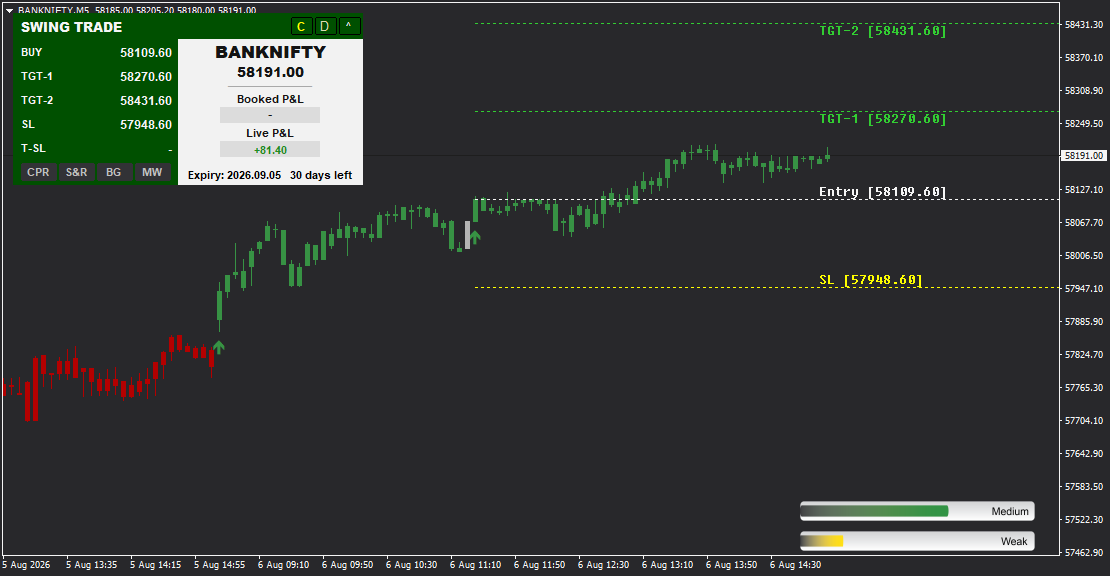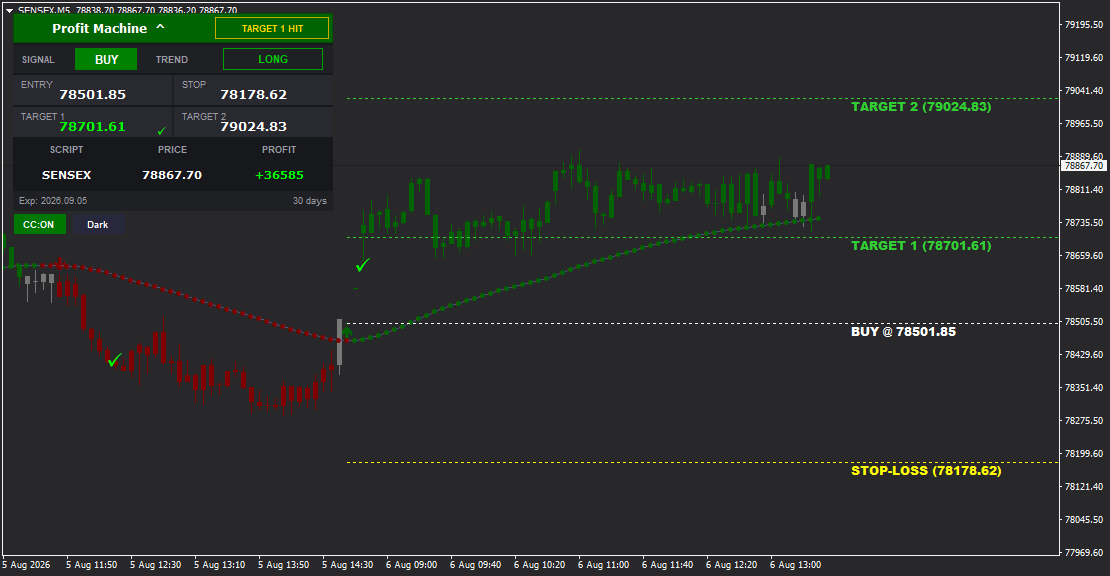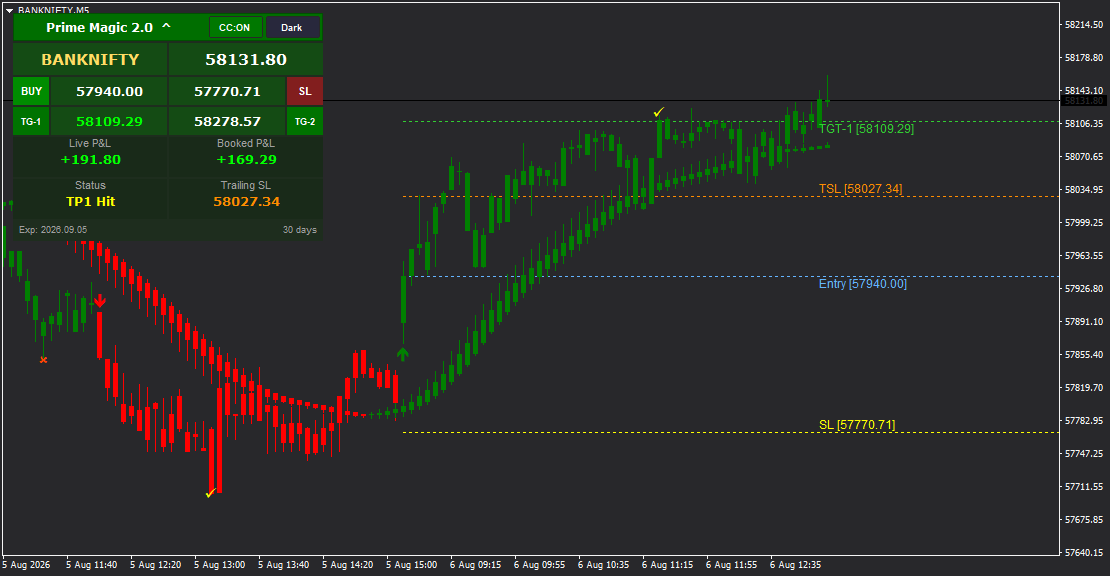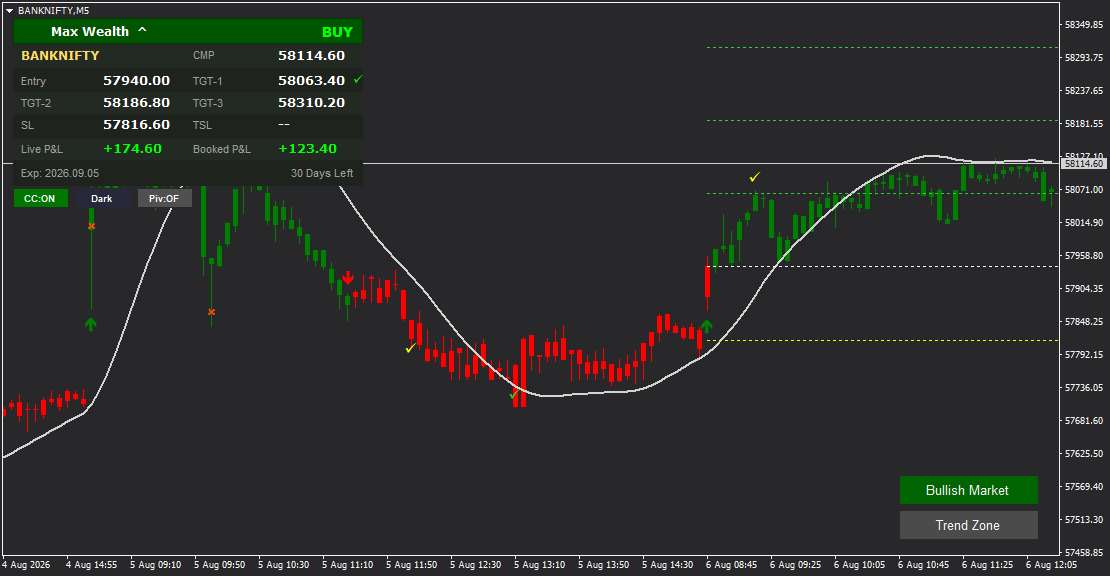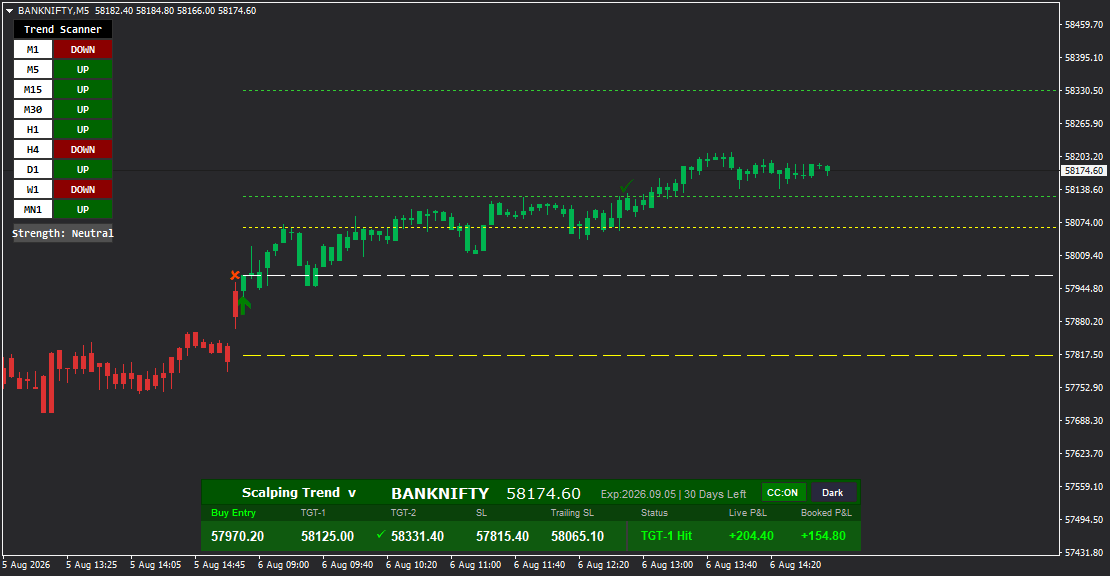

Master the art of precision scalping with Scalping Trend-the ultimate multi-timeframe indicator designed for fast-paced traders. Featuring an intelligent Trend Scanner that analyzes MT4 Data Feed 9 timeframes simultaneously (M1 to Monthly), this indicator identifies the strongest trend alignments for high-probability scalping opportunities. Whether you're trading indices, forex, or commodities, Scalping Trend provides crystal-clear BUY/SELL signals, adaptive Trailing Stop Loss, dual targets, and real-time performance tracking. The built-in Strength Indicator shows overall market sentiment, while the color-coded dashboard instantly communicates trade direction. Perfect for day traders and scalpers who need rapid decision-making tools backed by multi-timeframe confirmation. Available with expiry tracking for derivatives trading, CC-ON/OFF color-coded candles, and Light/Dark theme options for comfortable chart viewing.
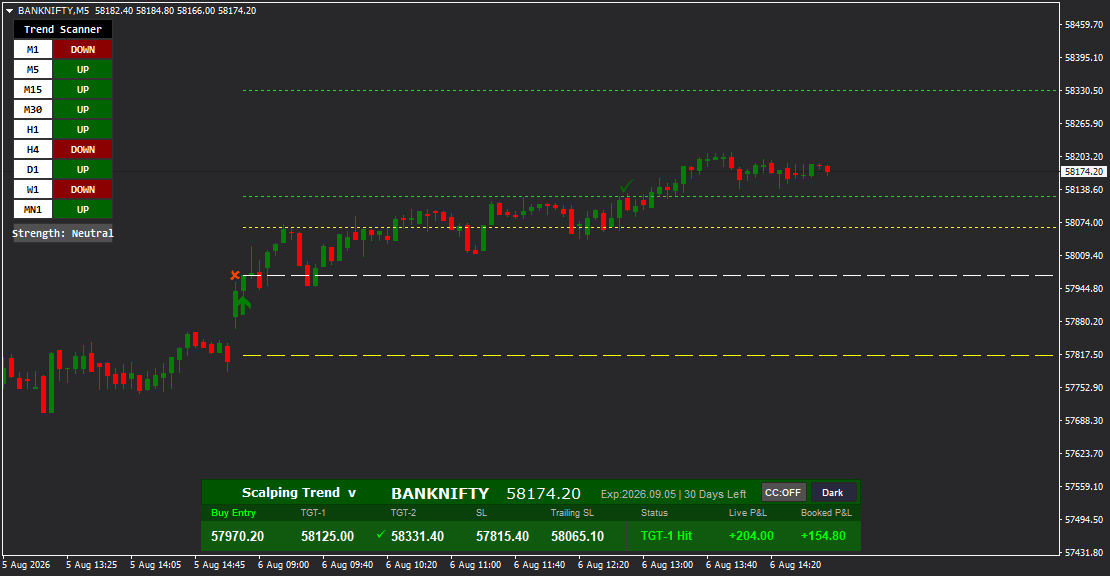
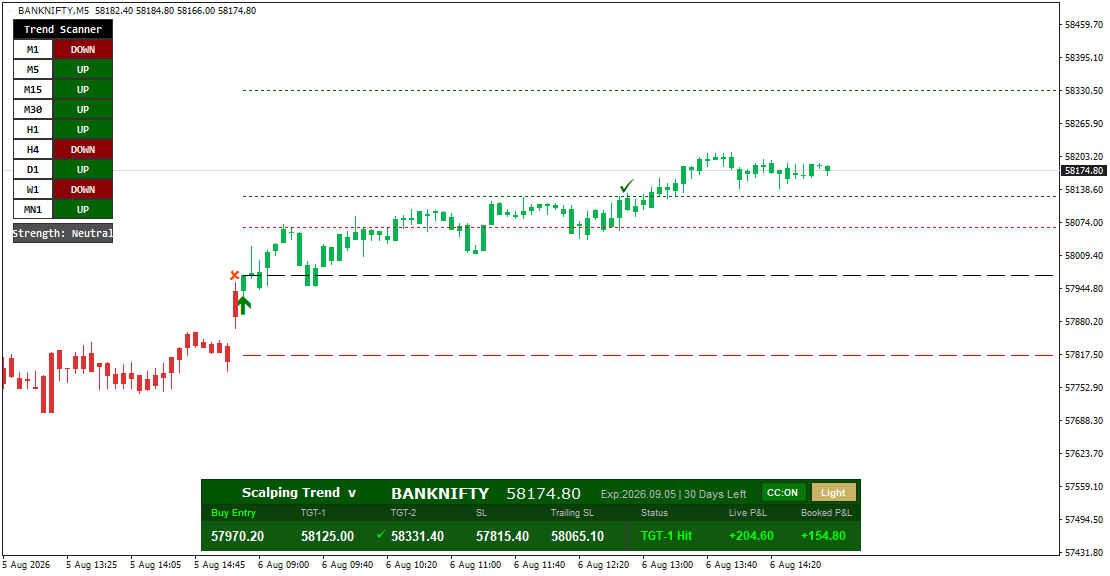
Scalping Trend is engineered for traders who thrive in fast-moving markets and need instant multi-timeframe confirmation before executing trades. The standout Trend Scanner analyzes nine timeframes simultaneously-from M1 (1-minute) to MN1 (Monthly)-displaying UP, DOWN, or neutral status for each period. This comprehensive view helps you identify powerful trend alignments where multiple timeframes agree, significantly increasing trade accuracy and reducing false signals.
Our data feed integration ensures precision signal delivery across all trading pairs.
The Strength Indicator complements the Trend Scanner by providing an overall market sentiment reading (Bearish, Neutral, Bullish), giving you instant awareness of market conditions. This leverages MT4 Data Feed for optimal performance. When combined with precise entry levels, dual targets (TGT-1 and TGT-2), and an adaptive Trailing Stop Loss, you have everything needed to capture quick profits while protecting capital.
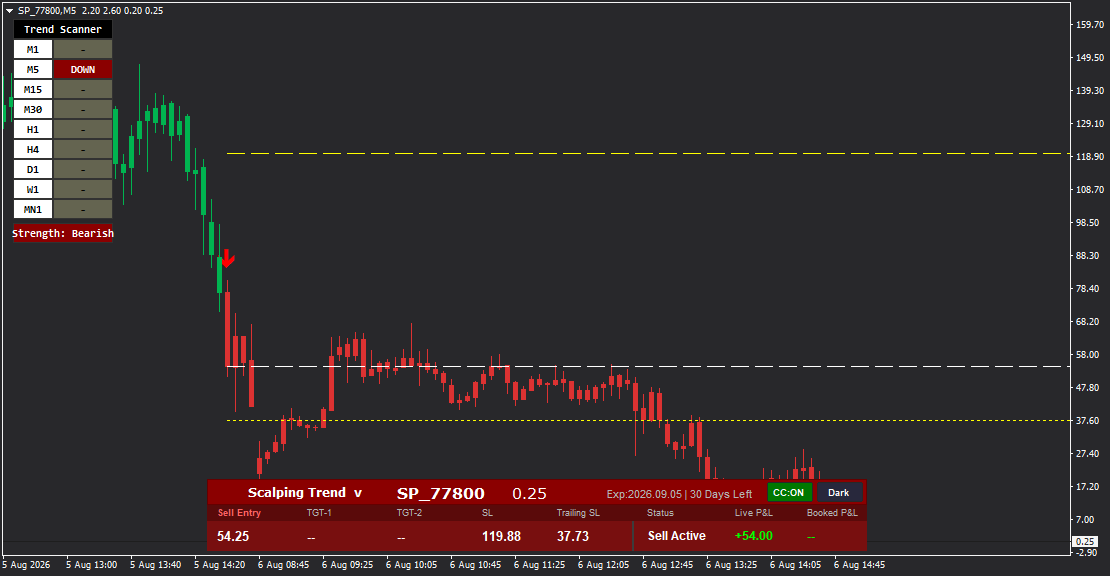
Scalping Trend's color-coded dashboard changes to green for BUY trades and red for SELL trades, providing immediate visual confirmation of your position direction. The Status Monitor keeps you informed with real-time updates like "TGT-1 Hit" or "Sell Active," while Live P&L and Booked P&L fields track your performance throughout the session. The built-in Expiry Tracker displays contract expiration dates and remaining days-essential for options and futures scalpers.
With visual entry markers (red X for BUY, red arrow for SELL), checkmark (-) confirmations when targets are achieved, horizontal support/resistance lines, and customizable color-coded candles (CC-ON/OFF), Scalping Trend delivers professional-grade functionality in an intuitive interface. Switch between Light and Dark themes for optimal chart visibility in any environment.
FEATURE HIGHLIGHTS
- Trend Scanner Panel - Displays 9 timeframes (M1, M5, M15, M30, H1, H4, D1, W1, MN1) with UP/DOWN/neutral indicators
- Strength Indicator - Shows overall market strength (Bearish, Neutral, Bullish) for sentiment analysis
- Multi-Timeframe Confirmation - Align multiple timeframes for high-probability scalping setups
- Dual Target System - TGT-1 and TGT-2 for progressive profit booking
- Adaptive Trailing Stop Loss - Protects profits as the market moves in your favor
- Color-Coded Dashboard - Green for BUY trades, red for SELL trades for instant visual confirmation
- Expiry Tracker - Displays contract expiration date and days remaining (essential for derivatives)
- Complete Trade Setup - Entry, Stop Loss (SL), Trailing SL, and two targets on every signal
- Real-Time Status Monitor - "TGT-1 Hit," "Sell Active," and other live trade status updates
- Live P&L Tracking - Real-time profit/loss display in green (profit) or red (loss)
- Booked P&L - Cumulative realized profit tracking throughout the session
- Visual Entry Markers - Red X for BUY entries, red arrow for SELL entries on chart
- Checkmark Confirmations - - symbol appears when targets are achieved
- CC-ON/OFF Toggle - Enable/disable color-coded candle sections for trend visualization
- Light/Dark Theme - Switch between light and dark backgrounds for comfortable viewing
- Horizontal Support/Resistance Lines - Key price levels marked with dotted lines
- Scalping-Optimized - Designed specifically for quick intraday and scalping trades
- One-Click Setup - All information displayed on a single, organized dashboard
- Suitable for All Markets - Works on indices, forex, commodities, stocks, and derivatives
RECOMMENDED APPROACH
Initial Setup:
1. Attach Scalping Trend indicator to your preferred chart (indices, forex, commodities)
2. Review the Trend Scanner panel for multi-timeframe trend alignment
3. Check the Strength Indicator for overall market sentiment
4. Wait for clear BUY or SELL signal with supporting timeframe confirmation
Trade Execution Strategy:
- For BUY Signals: Look for multiple "UP" readings in the Trend Scanner (especially M5, M15, M30) with Neutral or Bullish strength
- For SELL Signals: Look for multiple "DOWN" readings with Bearish or Neutral strength
- Enter at the specified Entry price when your chosen timeframe generates a signal
- Place Stop Loss at the SL level provided
- Book 50% position at TGT-1, move stop to breakeven or use Trailing SL
- Hold remaining 50% for TGT-2 or let Trailing SL protect profits
Multi-Timeframe Confirmation Checklist:
- - Primary scalping timeframe (M5 or M15) shows signal direction
- - At least 2-3 higher timeframes (M30, H1, H4) confirm the same trend
- - Strength Indicator aligns with signal direction (Bullish for BUY, Bearish for SELL)
- - Entry marker (X or arrow) appears on chart
Recommended Timeframes:
- Ultra-Fast Scalping: M1, M5 (30-second to 5-minute holds)
- Standard Scalping: M5, M15 (5-15 minute holds)
- Intraday Scalping: M15, M30 (15-30 minute holds)
Performance Monitoring:
- Monitor Live P&L in real-time to gauge trade performance
- Watch Status field for target achievements ("TGT-1 Hit")
- Track Booked P&L to measure cumulative session profits
- For derivatives, keep an eye on Expiry Tracker to avoid last-minute positions
Risk Management:
- Never ignore the Stop Loss level
- Use Trailing SL feature once TGT-1 is achieved
- Reduce position size when Strength shows "Neutral" (mixed signals)
- Avoid trading when most timeframes conflict (e.g., M5 UP, H1 DOWN, H4 DOWN)
---
TREND SCANNER MASTERY GUIDE
Understanding the Trend Scanner:
The Trend Scanner is Scalping Trend's most powerful feature, providing a snapshot of market direction across 9 timeframes:
- M1 (1-Minute): Ultra-short-term momentum
- M5 (5-Minute): Short-term scalping trends
- M15 (15-Minute): Intraday trend confirmation
- M30 (30-Minute): Medium-term intraday direction
- H1 (1-Hour): Hourly trend bias
- H4 (4-Hour): Swing trend context
- D1 (Daily): Primary trend direction
- W1 (Weekly): Long-term trend alignment
- MN1 (Monthly): Major trend backdrop
Color Coding:
- Green "UP": Bullish trend on that timeframe
- Red "DOWN": Bearish trend on that timeframe
- Gray "-": Neutral or no clear trend
Optimal Scalping Scenarios:
1. Strong Alignment (70%+ same direction): When 6-7+ timeframes show the same trend direction (all UP or all DOWN), scalping success rate increases dramatically
2. Mixed Signals (Caution Zone): When timeframes are evenly split (e.g., M5 UP, M15 UP, but H1 DOWN, H4 DOWN), reduce position size or wait for clarity
3. Timeframe Priority for Scalpers: Focus on M5, M15, M30 alignment first, then check H1 and H4 for higher timeframe support
Strength Indicator Context:
- Bullish: Majority of timeframes trending UP, ideal for BUY signals
- Bearish: Majority of timeframes trending DOWN, ideal for SELL signals
- Neutral: Mixed timeframe signals, proceed with caution or wait for clearer setup
Example Scenarios:
- Screenshot 1 (BANKNIFTY): M5, M15, M30, H1, D1, MN1 show UP (6 out of 9), Strength = Neutral - Strong BUY candidate despite neutral strength
- Screenshot 4 (SP_77800): Only M5 shows DOWN, others neutral, Strength = Bearish - Early SELL signal, use smaller position size
DASHBOARD INFORMATION GUIDE
Top Row - Indicator Title & Instrument:
- "Scalping Trend -" with dropdown: Indicator name, checkmark confirms active signal
- Instrument Name & Price: Shows current trading symbol and live price (e.g., BANKNIFTY 58174.60, SP_77800 0.25)
- Expiry Tracker: "Exp 2026.09.05 | 30 Days Left" - Critical for options/futures traders
Middle Row - Trade Parameters:
- Buy Entry / Sell Entry: Exact entry price for the signal
- TGT-1: First target level (recommended to book 50% position)
- TGT-2: Second target level (hold remaining position or trail stop)
- SL (Stop Loss): Fixed stop loss level to limit risk
- Trailing SL: Adaptive stop loss that follows price, protecting profits beyond TGT-1
Right Section - Performance Tracking:
- Status: Live trade status updates
- "TGT-1 Hit" (green text): First target achieved
- "Sell Active" / "Buy Active" (red/green): Trade currently open
- Live P&L: Real-time unrealized profit/loss (green for profit, red for loss)
- Booked P&L: Cumulative realized profits for the session
Bottom Right - Display Controls:
- CC-ON / CC-OFF: Toggle color-coded candle sections (ON = solid color trend sections, OFF = traditional candles)
- Dark / Light: Switch between dark background (easier on eyes) and light background (professional appearance)
Dashboard Color Logic:
- Green Dashboard: Indicates BUY trade active
- Red Dashboard: Indicates SELL trade active
VISUAL ELEMENTS GUIDE
On-Chart Markers:
- Red X (-): Marks BUY entry point on the chart
- Red Arrow (-): Marks SELL entry point on the chart
- Checkmark (-): Appears on chart when TGT-1 or TGT-2 is achieved
- White Dashed Lines: Horizontal lines indicating entry, stop loss, and target levels
- Dotted Green/Yellow Lines: Support and resistance levels based on price structure
Candle Color-Coding (CC-ON Mode):
- Solid Green Sections: Bullish trend periods
- Solid Red Sections: Bearish trend periods
- Helps visualize trend strength and momentum at a glance
Trend Scanner Panel (Left Side):
- Each timeframe row shows colored buttons (green UP, red DOWN, gray neutral)
- "Strength: Bearish/Neutral/Bullish" at bottom summarizes overall market condition
Dashboard Theme:
- Dark Mode: Black background, easier for extended trading sessions
- Light Mode: White background, professional for presentations or bright environments
TECHNICAL SPECIFICATIONS
Indicator Type: Trend-following scalping system with multi-timeframe analysis
Signal Types: BUY and SELL with dual targets
Timeframe Coverage: M1, M5, M15, M30, H1, H4, D1, W1, MN1 (9 timeframes)
Stop Loss: Fixed SL + Adaptive Trailing SL
Target System: Dual targets (TGT-1, TGT-2)
Performance Tracking: Real-time Live P&L and Booked P&L
Visual Aids: Entry markers, checkmarks, support/resistance lines, color-coded candles
Customization: CC-ON/OFF toggle, Light/Dark theme, Trend Scanner panel
Suitable Markets: Indices, Forex, Commodities, Stocks, Derivatives
Recommended Timeframes: M5, M15, M30 for scalping; M1 for ultra-fast scalping
Special Features: Expiry tracker for options/futures, Strength Indicator for market sentiment
Platform: MetaTrader 4 (MT4).