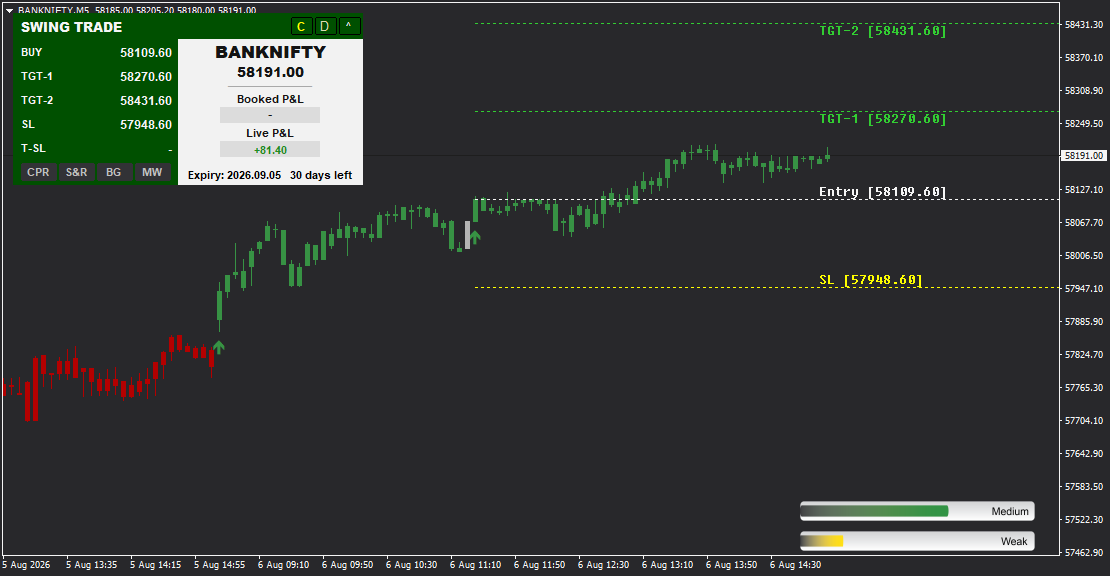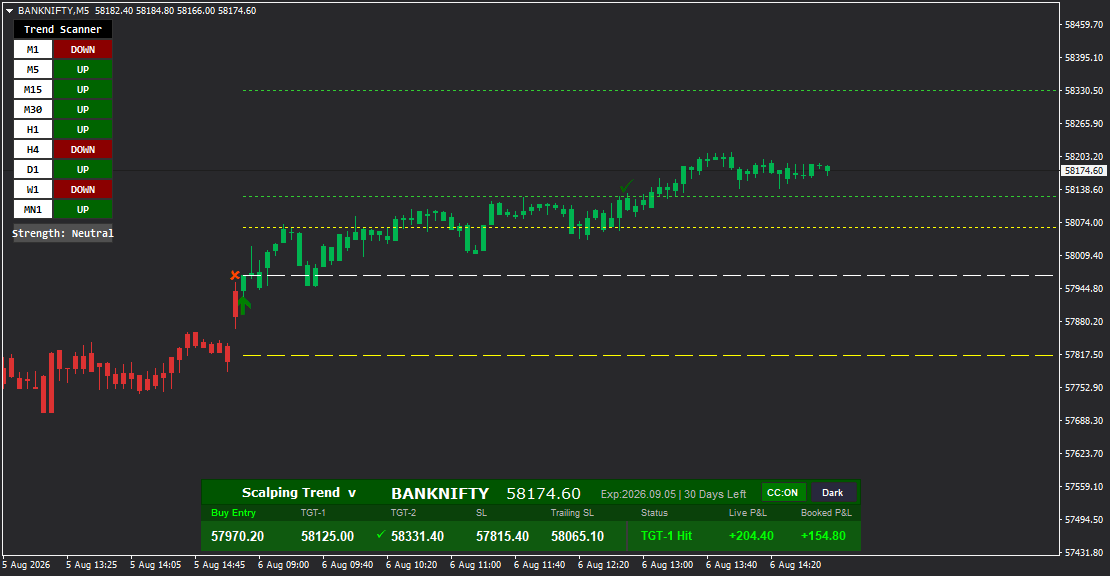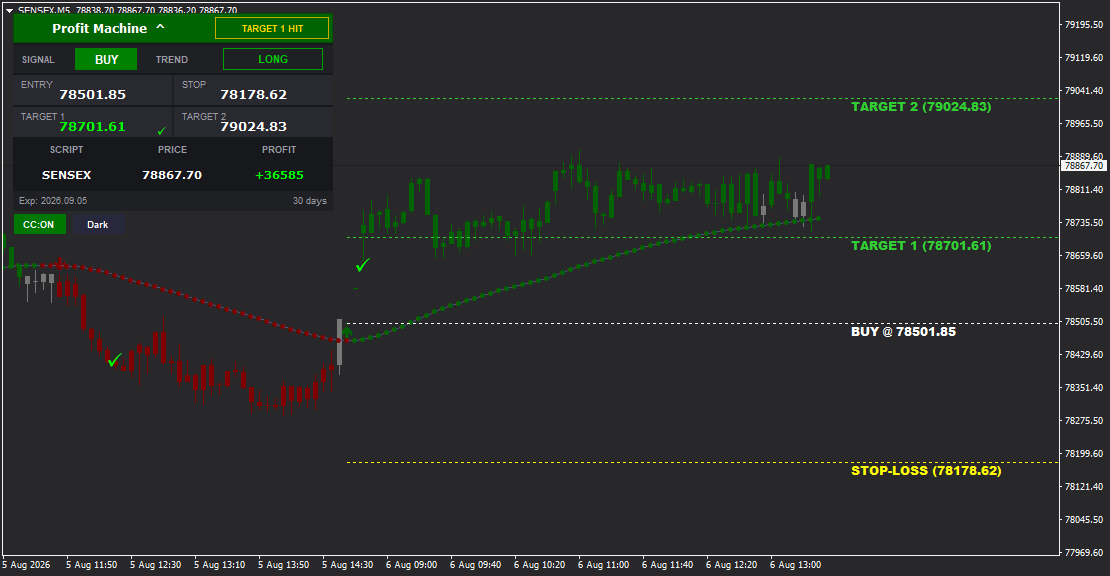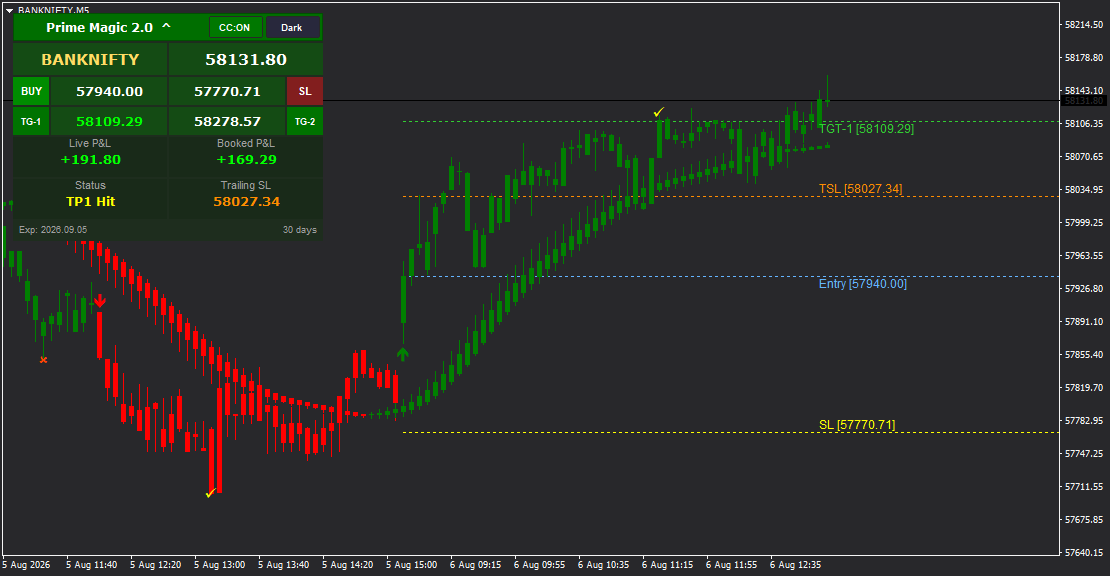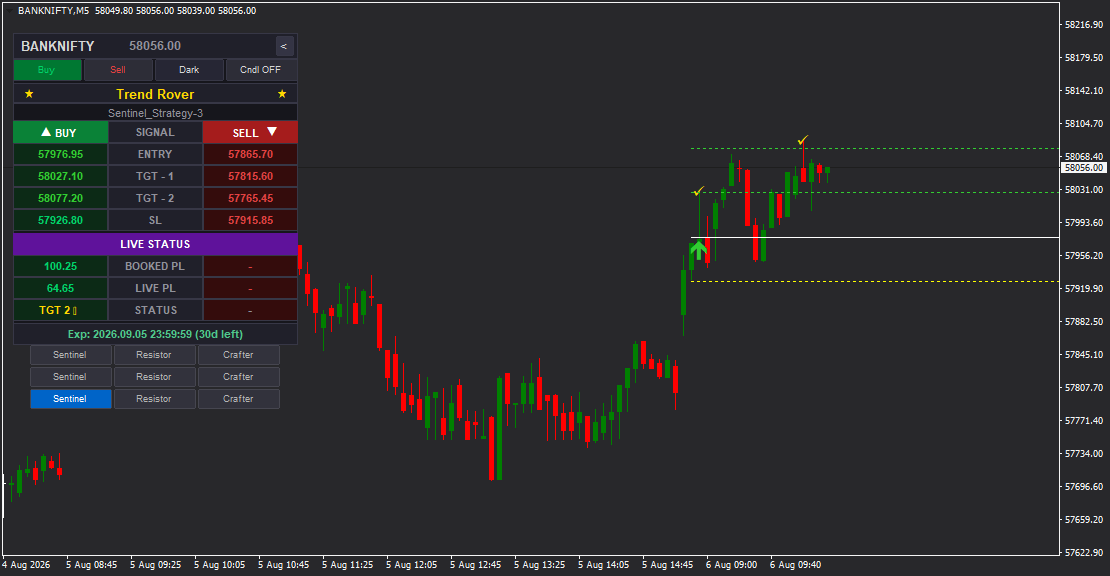

Trend Rover is an advanced intraday MT4 indicator featuring 9 built-in trading strategies (3 each for Sentinel, Resistor, and Crafter profiles) that deliver precise BUY and SELL signals with auto-calculated Entry Price, Stop Loss, Target 1, and Target 2. It includes a sophisticated real-time MT4 Data Feed dashboard with live profit tracking, customizable visual controls (color-coded candles, entry line display toggles, light/dark themes), strategy-based signal confirmation, and comprehensive trade status monitoring. Designed exclusively for intraday trading with maximum visual flexibility and control.
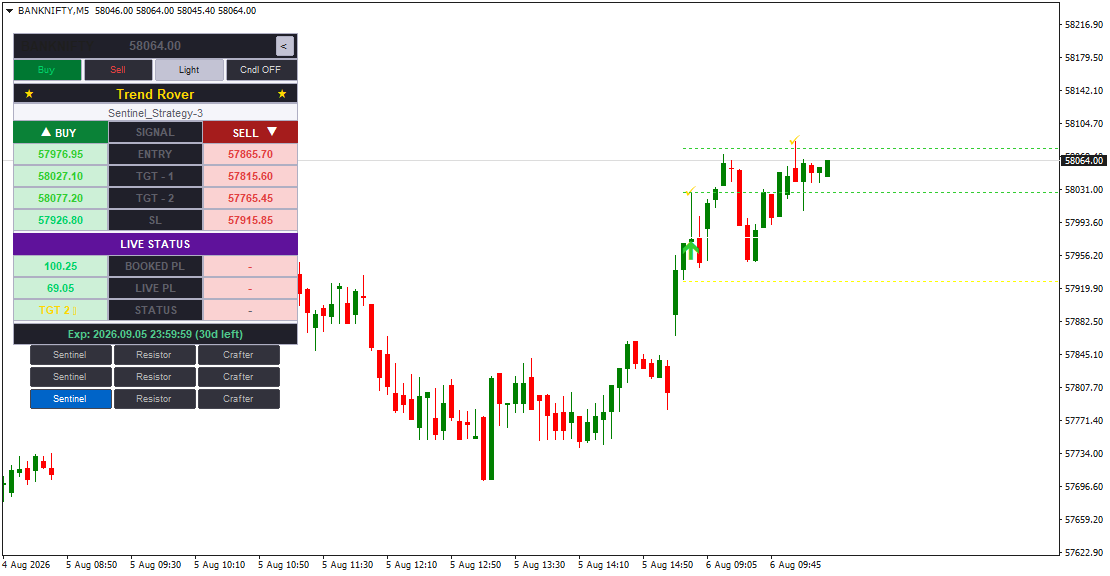
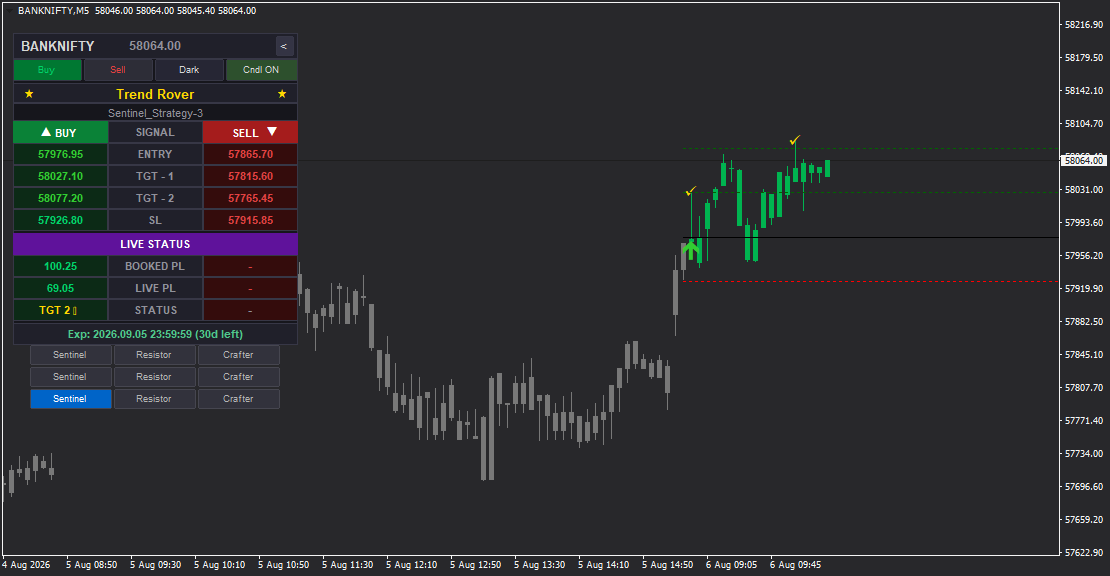
Trend Rover - Multi-Strategy Intraday Signal System with Advanced Visual Controls
Trend Rover is a professional-grade intraday trading indicator for MetaTrader 4 that combines the analytical power of 9 distinct trading strategies with unparalleled visual customization and control. Built for traders who demand both precision and flexibility, Trend Rover delivers complete trade setups - from entry to exit - while giving you full command over your chart's visual presentation.
Unlike traditional indicators that lock you into a single visual style, Trend Rover puts you in control. Toggle color-coded candles on or off with a single click. Show or hide entry lines based on your preference. Switch between dark and light chart themes to match your workspace. All while receiving high-probability BUY and SELL signals backed by 9 proven intraday strategies.
Whether you're a conservative trend follower using Sentinel strategies, a balanced trader preferring Resistor approaches, or an aggressive scalper leveraging Crafter algorithms, Trend Rover adapts to your style and visual preferences - making it the most versatile intraday signal system available for MT4.
What Makes Trend Rover Unique?
Trend Rover is engineered specifically for intraday trading with a focus on both analytical accuracy and visual clarity. It provides:
- 9 Built-In Strategies - Three strategy profiles (Sentinel, Resistor, Crafter), each containing 3 unique algorithms optimized for different intraday market conditions
- Complete Trade Management - Auto-calculated Entry, Stop Loss, Target 1, and Target 2 for every signal
- Real-Time Dashboard - Live tracking of signals, profit/loss, target completion, and trade status with color-themed visual feedback
- Visual Control Center - Toggle buttons for color candles (Cndl ON/OFF), entry lines (Buy/Sell), and chart themes (Dark/Light)
- Multi-Signal Confirmation - Compare signals across all 9 strategies for higher-probability setups
- On-Chart Visual Markers - Clear buy/sell arrows and labeled price level lines (can be shown/hidden)
- Strategy Status Tracking - Monitor exactly which trades are waiting, active, or have hit targets
- Customizable Display - Complete control over what you see and how you see it
- Live Profit Monitor - Real-time BOOKED PL and LIVE PL tracking throughout the trading session
- Comprehensive Alert System - Popup, sound, and mobile notifications for all signal events
The 9-Strategy Architecture
Trend Rover organizes its 9 strategies into three distinct trading profiles, each designed for a specific risk tolerance and trading frequency. Within each profile, three unique algorithms work independently to capture different market opportunities:
SENTINEL (Conservative Profile)
Strategy 1 - Sentinel: Trend confirmation with multi-timeframe validation
Strategy 2 - Sentinel: Breakout detection with volume and momentum filters
Strategy 3 - Sentinel: Support/resistance bounce with strict price action criteria
Best for: Traders who prioritize quality over quantity, prefer lower-risk entries with higher accuracy rates, and want fewer but more reliable signals throughout the trading session.
RESISTOR (Balanced Profile)
Strategy 1 - Resistor: Dynamic support/resistance with adaptive price zones
Strategy 2 - Resistor: Momentum reversal with trend strength confirmation
Strategy 3 - Resistor: Moving average convergence with volatility filtering
Best for: Traders seeking a balance between signal frequency and reliability, comfortable with moderate risk parameters, and looking for consistent opportunities without overtrading.
CRAFTER (Aggressive Profile)
Strategy 1 - Crafter: Fast momentum scalping with tight entry precision
Strategy 2 - Crafter: Volatility breakout system optimized for quick moves
Strategy 3 - Crafter: Rapid price action pattern recognition with delivers MT4 Data Feed-powered immediate execution signals
Best for: Active intraday traders who want more frequent opportunities, are comfortable with tighter stops and faster execution, and can manage multiple trades during a single session.
Each strategy calculates its own entry levels, stop loss, and profit targets based on current market volatility, price structure, and momentum characteristics. You can switch between all 9 strategies at any time using the intuitive strategy selector grid on the dashboard.
How Signals Are Generated
Trend Rover continuously analyzes price action, momentum, volatility, and market structure across your selected timeframe. When a strategy identifies a valid trading opportunity, it generates a signal and automatically calculates four essential price levels:
- Entry Price - The optimal price to enter the trade based on the strategy's algorithm
- Stop Loss (SL) - A protective level calculated to manage risk while allowing room for natural price movement
- Target 1 (TGT-1) - Conservative profit target for partial position booking
- Target 2 (TGT-2) - Extended profit target for maximum gain capture
All levels are displayed instantly on the dashboard and can be visualized on the chart using dotted horizontal lines (controlled by the Buy/Sell toggle buttons).
When a BUY signal is detected:
- A green upward arrow appears below the candle on the chart
- The dashboard switches to a green color theme
- BUY section displays Entry, TGT-1, TGT-2, and SL prices
- Trade status shows "- BUY" with "SIGNAL" indicator
- If color candles are enabled (Cndl ON), candles turn green
When a SELL signal is detected:
- A red downward arrow appears above the candle on the chart
- The dashboard switches to a red color theme
- SELL section displays Entry, TGT-1, TGT-2, and SL prices
- Trade status shows "- SELL" with "SIGNAL" indicator
- If color candles are enabled (Cndl ON), candles turn red
As the trade progresses, Trend Rover continuously monitors price action and updates the status in real time, showing when targets are hit or when the stop loss is triggered.
Real-Time Trading Dashboard
The Trend Rover dashboard is your command center for intraday trading, providing complete situational awareness with all essential information organized in a clean, professional interface:
Header Section:
- Symbol name and live current price
- Four control buttons: Buy | Sell | Dark/Light | Cndl ON/OFF
- Indicator name with visual markers: - TREND ROVER -
- Active strategy display (e.g., "Sentinel_Strategy-3")
Signal Sections:
- BUY Section - Shows Entry, TGT-1, TGT-2, and SL for buy signals
- Signal indicator: - BUY with "SIGNAL" label
- All price levels clearly labeled and color-coded in green
- SELL Section - Shows Entry, TGT-1, TGT-2, and SL for sell signals
- Signal indicator: - SELL with "SIGNAL" label
- All price levels clearly labeled and color-coded in red
Live Status Panel:
- BOOKED PL - Displays realized profit/loss when targets are hit (e.g., +100.25 points)
- LIVE PL - Shows running profit/loss in real time (e.g., +69.05 points)
- STATUS - Trade status indicator
- Target Indicator - Visual marker showing which target is active (e.g., "TGT 2 -")
- Expiration Timer - Shows strategy expiry with countdown (e.g., "Exp: 2026.08.06 23:59:59 (30d left)")
Strategy Selector Grid:
Three rows of clickable buttons allow instant switching between all 9 strategies:
- Row 1: Sentinel | Resistor | Crafter
- Row 2: Sentinel | Resistor | Crafter
- Row 3: Sentinel | Resistor | Crafter
The active strategy is highlighted with a blue background, making it immediately clear which algorithm is currently running. This 3x3 grid layout provides visual symmetry and one-click access to any strategy profile.
Visual Control System - Your Chart, Your Way
Trend Rover's visual control system is what sets it apart from traditional indicators. Four powerful toggle buttons give you complete control over your chart's appearance:
1. Buy Button (Show/Hide Buy Entry Lines)
- ON (Green) - Displays all BUY signal entry lines, targets, and stop loss levels on the chart
- OFF (Gray) - Hides BUY signal lines, keeping your chart clean while still showing sell signals
- Use this when you only want to focus on sell opportunities or when buy lines clutter your analysis
2. Sell Button (Show/Hide Sell Entry Lines)
- ON (Red) - Displays all SELL signal entry lines, targets, and stop loss levels on the chart
- OFF (Gray) - Hides SELL signal lines, keeping only buy signals visible
- Use this when you only want to focus on buy opportunities or when sell lines are not needed
3. Dark/Light Button (Chart Theme Control)
- Dark Theme - Optimized for extended screen time with reduced eye strain, professional trading aesthetic
- Light Theme - Clean, bright background for well-lit environments or personal preference
- Instantly switch between themes without reloading the indicator
4. Cndl Button (Color Candles ON/OFF)
- Cndl ON - Activates color-coded candles that change based on signal direction:
- Green candles during active BUY signals
- Red candles during active SELL signals
- Gray/neutral candles when no signal is active
- Cndl OFF - Returns to standard chart candle colors, showing only arrows and price lines
- Perfect for traders who prefer traditional candlestick analysis without color interference
These controls work independently - you can mix and match any combination. For example:
- Show only BUY lines with color candles OFF for a minimalist buy-only setup
- Enable SELL lines, color candles ON, and light theme for maximum visual feedback
- Hide all entry lines but keep color candles ON for signal awareness without chart clutter
This level of customization ensures Trend Rover adapts to your exact visual preferences and trading workflow.
On-Chart Price Level Lines (Toggle-Controlled)
When Buy and/or Sell buttons are enabled, Trend Rover draws clearly labeled dotted horizontal lines directly on your chart:
- Entry Line - Shows the exact entry price with "BUY @ price" or "SELL @ price" label
- Stop Loss Line - Marked with "STOP-LOSS (price)" label
- Target 1 Line - Marked with "TARGET 1 (price)" label
- Target 2 Line - Marked with "TARGET 2 (price)" label
Each line is color-coded for instant recognition:
- Green lines for BUY signals
- Red lines for SELL signals
Visual checkmarks (-) appear next to targets on both the chart and dashboard when they are hit, providing clear confirmation of trade milestones.
The ability to show/hide these lines independently for buy and sell signals means you never have to deal with visual clutter - show only what matters for your current trading focus.
Live Status & Profit Tracking
The "LIVE STATUS" section on the dashboard provides real-time trade performance metrics:
BOOKED PL (Booked Profit/Loss):
Shows realized gains or losses when targets are hit. Example: "+100.25" means you've booked 100.25 points of profit at Target 1 or Target 2. This number updates only when a target level is reached and profit is locked in.
LIVE PL (Live Profit/Loss):
Shows your current running profit or loss in real time as price moves. This number updates continuously while a trade is active, giving you instant feedback on trade performance. Example: "+69.05" means the current market price is 69.05 points above your entry (for a buy) or below your entry (for a sell).
STATUS:
Displays the current trade state and any important status messages. Common status indicators include:
- "SIGNAL" - New signal generated, waiting for entry confirmation
- "ACTIVE" - Trade is live and being monitored
- "TGT 1 HIT" - First target reached
- "TGT 2 HIT" - Second target reached
- "SL HIT" - Stop loss triggered
Target Indicator:
Visual arrow showing which target is currently being tracked (e.g., "TGT 2 -" indicates the system is monitoring Target 2).
This real-time feedback keeps you informed throughout the entire trade lifecycle without needing to manually calculate profit or check price levels.
Color-Coded Visual Feedback
Trend Rover uses intelligent color theming to provide instant visual recognition of market conditions and trade direction:
Dashboard Color Themes:
- Green Theme - Active BUY signal, bullish bias, long trade in progress
- Red Theme - Active SELL signal, bearish bias, short trade in progress
- Neutral Theme - No active signal, standby mode
Chart Candles (When Cndl ON):
- Green Candles - Active BUY signal period, bullish momentum
- Red Candles - Active SELL signal period, bearish momentum
- Gray/White Candles - Neutral period, no clear signal
Arrow Signals:
- Green Upward Arrow (-) - BUY signal candle
- Red Downward Arrow (-) - SELL signal candle
This color system creates visual harmony across the entire interface, helping you maintain awareness of the current market state at a glance without reading labels or numbers.
Alert & Notification System
Never miss a trading opportunity or critical trade event. Trend Rover provides comprehensive real-time alerts through multiple channels:
- Popup Alerts - On-screen MT4 alert dialog with detailed message and trade levels
- Sound Alerts - Audible notification with customizable sound file
- Mobile Push Notifications - Alerts delivered directly to your mobile device with trade details
Alerts are triggered for:
- New BUY or SELL signal (including all four price levels: Entry, SL, TGT-1, TGT-2)
- Strategy change notification
- Target 1 hit
- Target 2 hit
- Stop Loss hit
- Signal expiration warnings
Each alert channel can be enabled or disabled individually in the indicator settings, giving you complete control over your notification preferences. You'll never miss an opportunity, even when away from your trading desk.
How to Trade with Trend Rover
Step 1: Setup
Attach Trend Rover to your chart on any intraday timeframe (M1, M5, M15, M30, H1). The indicator works on all instruments: stocks, indices, forex pairs, commodities, and cryptocurrencies.
Step 2: Choose Your Strategy Profile
Select your preferred strategy profile based on your trading style:
- Sentinel for conservative, high-accuracy signals
- Resistor for balanced, moderate-frequency signals
- Crafter for aggressive, high-frequency signals
Click one of the strategy buttons at the bottom of the dashboard to activate it. Start with Strategy 1 within your chosen profile.
Step 3: Configure Visual Preferences
Set up your chart display using the control buttons:
- Enable or disable color candles (Cndl ON/OFF)
- Choose dark or light theme (Dark/Light button)
- Show or hide buy/sell entry lines (Buy/Sell buttons)
Step 4: Wait for Signal
Monitor the chart for a BUY (green arrow) or SELL (red arrow) signal. When a signal appears:
- The dashboard immediately populates with Entry, SL, TGT-1, and TGT-2 prices
- The signal section lights up with the trade direction (- BUY or - SELL)
- If entry lines are enabled, dotted lines appear on the chart showing all levels
Step 5: Enter the Trade
Enter the trade at the displayed entry price. Set your stop loss exactly as shown on the dashboard. Set your first take-profit order at Target 1 and your second at Target 2.
Step 6: Monitor & Manage
Watch the "LIVE STATUS" section for real-time updates:
- LIVE PL shows your current profit/loss as the trade develops
- STATUS updates when targets are hit or if stop loss is triggered
- BOOKED PL updates when you realize profits at Target 1 or Target 2
Step 7: Exit Strategy
When Target 1 is hit (marked with - on dashboard):
- Book partial profits (recommended: 50-60% of position)
- Move your stop loss to breakeven to protect capital
- Let the remaining position run toward Target 2 for maximum gains
When Target 2 is hit:
- Close remaining position and book full profits
- BOOKED PL displays your total realized gain
Advanced Technique - Multi-Strategy Confirmation
For the highest-probability setups, run two or three different strategies on separate charts of the same instrument. When multiple strategies from different profiles (e.g., Sentinel + Resistor) generate the same signal direction simultaneously, you have a stronger, more reliable setup with higher conviction. Consider increasing position size or holding longer on these confirmed signals.
Intraday Focus & Time Management
Trend Rover is designed exclusively for intraday trading - all strategies, signals, targets, and stop levels are optimized for same-day completion. The indicator is calibrated to capture short-term momentum, volatility expansions, and price swings that occur within a single trading session.
Key intraday features:
- Session-Based Logic - Signals reset at the start of each new trading session
- Expiration Timer - Shows when the current signal calculation period expires (visible on dashboard)
- Time-Based Filters - Some strategies include time-of-day filters to avoid low-volume periods
- Fast Target Calculation - Targets are set to realistic intraday profit levels, not multi-day swings
The expiration timer (e.g., "Exp: 2026.08.06 23:59:59 (30d left)") helps you track MT4 Data Feed signal validity and ensures you're always working with fresh, current market data.
Customization Options
Trend Rover offers extensive customization through its input parameters:
Visual Settings:
- Dashboard position (Left-Upper, Right-Upper, Left-Lower, Right-Lower)
- Default chart theme (Dark or Light)
- Default candle color mode (Cndl ON or OFF)
- Default entry line display (Buy/Sell lines shown or hidden)
- Custom colors for arrows, lines, and text labels
- Font size and style for dashboard text
Alert Settings:
- Enable/disable popup alerts
- Enable/disable sound alerts
- Enable/disable mobile push notifications
- Custom sound file selection
- Alert message templates
Strategy Settings:
- Default strategy on indicator load (choose which of the 9 strategies loads automatically)
- Strategy-specific parameter adjustments (for advanced users)
- Timeframe optimization presets
Performance Settings:
- Signal sensitivity (adjust for more/fewer signals)
- Target calculation method (conservative, balanced, aggressive)
- Stop loss distance multiplier
All settings are accessible through the standard MT4 indicator properties dialog, making customization straightforward even for beginners.
Why Choose Trend Rover?
For Beginners:
Trend Rover eliminates the complexity of intraday trading. You don't need to calculate support/resistance, draw trendlines, or analyze multiple indicators. Just follow the signals, use the provided levels, and let the strategy do the analytical work. The visual controls help you learn without being overwhelmed by chart clutter.
For Intermediate Traders:
The 9-strategy framework lets you test different approaches and find what works best for your personality and schedule. Compare conservative vs. aggressive strategies. Learn how different algorithms respond to various market conditions. Use the visual controls to focus on specific signal types.
For Advanced Traders:
Leverage multi-strategy confirmation for higher-edge setups. Run multiple Trend Rover instances across different timeframes and strategies. Use the toggle controls to isolate specific signal patterns. Combine Trend Rover signals with your own analysis for enhanced decision-making.
For Visual-Focused Traders:
If you're sensitive to chart clutter or prefer a specific visual aesthetic, Trend Rover's control system is built for you. Show only what you need. Hide what you don't. Switch between light and dark themes based on time of day or workspace lighting. No other indicator offers this level of visual flexibility.
For Active Intraday Traders:
With 9 strategies and real-time profit tracking, Trend Rover keeps you engaged and informed throughout the trading session. Multiple strategies mean more opportunities without overtrading. Live PL tracking helps you make informed decisions about position management and exits.
Technical Specifications
- Platform: MetaTrader 4 (MT4)
- Trading Style: Intraday only (all signals designed for same-day completion)
- Strategy Profiles: 3 (Sentinel, Resistor, Crafter)
- Total Strategies: 9 (3 per profile)
- Instruments: All (Stocks, Indices, Forex, Commodities, Cryptocurrencies)
- Timeframes: All intraday timeframes (M1, M5, M15, M30, H1)
- Signal Components: Entry, Stop Loss, Target 1, Target 2
- Visual Controls: Buy/Sell line toggles, Cndl ON/OFF, Dark/Light themes
- Alert Types: Popup, Sound, Mobile Push
- Dashboard Positions: 4 (all corners)
- Visual Elements: On-chart arrows, labeled price level lines (toggle-controlled), color-coded candles (toggle-controlled)
- Performance Tracking: Real-time BOOKED PL and LIVE PL display
- Repainting: No (all signals are final and permanent)
Package Includes
- Trend Rover MT4 Indicator (.ex4 file)
- Installation Guide (PDF)
- User Manual with Strategy Explanations (PDF)
- Visual Controls Quick Reference Guide (PDF)
- Video Tutorial - Setup & Configuration
- Video Tutorial - Trading with Each Strategy Profile
- Video Tutorial - Mastering Visual Controls
- Video Tutorial - Multi-Strategy Confirmation Techniques
- Lifetime License (Single Account)
- Free Updates for 1 Year
- Email Support
Start Trading with Clarity and Control
Trend Rover represents the next evolution in intraday trading indicators - combining powerful multi-strategy analysis with unprecedented visual control and customization. Whether you're looking to improve your entry timing, manage risk more effectively, or simply enjoy a cleaner, more personalized chart experience, Trend Rover delivers everything you need in one comprehensive package.
With 9 strategies at your fingertips, real-time profit tracking, and complete control over your chart's visual presentation, you have everything you need to navigate intraday markets with confidence and precision.
Transform your intraday trading today - let Trend Rover guide you to better entries, clearer targets, and more consistent results.
========================================
FEATURE HIGHLIGHTS (Bullet Points for Product Page)
========================================
- 9 Built-In Intraday Strategies - 3 each for Sentinel (conservative), Resistor (balanced), and Crafter (aggressive) profiles
- Complete Trade Management - Auto-calculated Entry, Stop Loss, Target 1, and Target 2 for every signal
- Real-Time Trading Dashboard - Live tracking of signals, trade status, and profit/loss with color-themed display
- Visual Control Center - Toggle buttons for color candles (Cndl ON/OFF), entry lines (Buy/Sell), and chart themes (Dark/Light)
- Buy/Sell Line Controls - Show or hide entry lines independently for clean chart customization
- Color Candle Toggle - Enable or disable color-coded candles based on signal direction (Cndl ON/OFF)
- Dark/Light Theme Switch - Instantly change chart theme to match your workspace and preferences
- Multi-Strategy Confirmation - Compare signals across 9 strategies for higher-probability setups
- On-Chart Visual Markers - Clear buy/sell arrows and labeled price level lines (toggle-controlled)
- Live Profit Tracking - BOOKED PL and LIVE PL displayed in real time
- Strategy Selector Grid - Switch between all 9 strategies with one click using 3x3 button layout
- Trade Status Monitoring - Know exactly when signals are waiting, active, or targets are hit
- Comprehensive Alert System - Popup, sound, and mobile push notifications for all signal events
- Intraday Optimized - Designed specifically for same-day trading across all instruments
- Works on All Timeframes - M1, M5, M15, M30, H1 - optimal for intraday sessions
- Customizable Dashboard - Position in any chart corner
- No Repainting - Signals are final and permanent once generated
- Maximum Visual Flexibility - Your chart, your way - control every visual element
========================================
RECOMMENDED TRADING APPROACH
========================================
For Conservative Traders:
Use Sentinel strategies. Wait for clear, high-conviction signals. Enter only when the reward-risk ratio is at least 1.5:1 (Target 1 distance is 1.5x your Stop Loss distance). Book 50% profits at Target 1 and move stop to breakeven. Let the remainder run to Target 2.
For Balanced Traders:
Use Resistor strategies. Look for 2:1 reward-risk setups. Book 50-60% at Target 1, trail your stop to breakeven or slightly positive, and hold the remainder toward Target 2. Monitor LIVE PL to make dynamic exit decisions.
For Aggressive Traders:
Use Crafter strategies. Trade with tighter stops and faster targets. Be prepared for higher frequency and quicker decision-making. Book profits quickly - consider taking full profits at Target 1 if momentum stalls. Re-enter on the next signal.
Multi-Strategy Confirmation (Advanced):
Run 2-3 strategies from different profiles on separate charts of the same instrument. When two or more strategies generate the same signal direction simultaneously:
- You have a higher-probability setup
- Consider increasing position size (within your risk limits)
- Hold longer toward Target 2 with more confidence
- These "confirmed" signals tend to have higher success rates
Visual Control Best Practices:
- Use Cndl ON when you want maximum visual feedback and instant signal awareness
- Use Cndl OFF when performing detailed candlestick pattern analysis
- Enable only Buy lines when looking for long opportunities (hide Sell lines to reduce clutter)
- Enable only Sell lines when looking for short opportunities (hide Buy lines)
- Switch to Light theme during daytime trading in well-lit rooms
- Switch to Dark theme during evening sessions or for extended screen time